Enhance Your Designs with the Brush Stroke Elements Set
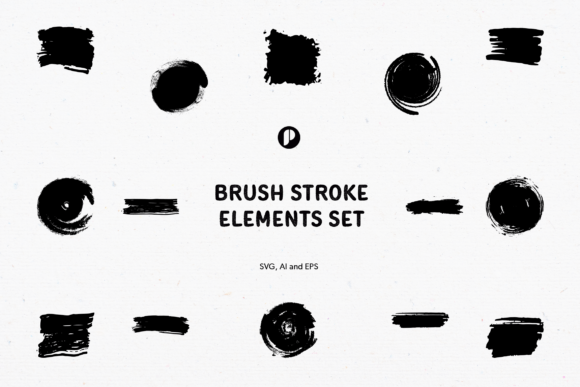
Designs that stand out often do so because of their unique textures and visual elements. The Brush Stroke Elements Set is a versatile tool for adding a more rough and raw brush touch to your creative projects. Whether you're crafting social media templates, designing posters, or enhancing presentations, this set offers an easy way to inject personality into your visuals.
What Is the Brush Stroke Elements Set?
The Brush Stroke Elements Set is a collection of 15 hand-crafted brush stroke designs, available in three distinct shapes: circles, rectangles, and squares. These elements are designed to mimic the natural flow and texture of real-life brush strokes, giving digital art a more organic and expressive feel. They are ideal for those who want to add subtle depth or bold accents without overcomplicating their workflow.
Key Features
- 15 Element Designs: A diverse range of styles ensures there's something for every project need.
- 300 dpi Resolution: High-quality output suitable for both print and digital use.
- RGB Colors: Vibrant and consistent color representation across screens.
- Well-Organized Layers: Each design is structured clearly for efficient editing.
- Properly Named Layers: Makes it easy to identify and modify specific elements.
- SVG, AI, and EPSv8 Formats: Compatibility with most vector-based design tools like Adobe Illustrator and Inkscape.
Who Can Benefit from This Set?
This set is not just for professional designers; it’s also accessible and useful for general consumers, business owners, and online creators. Its intuitive structure and high scalability make it perfect for anyone working on branding materials, digital illustrations, or content marketing assets. It can be especially helpful for individuals who may not have advanced graphic design skills but still want to produce polished, visually engaging work.
Professionals and Designers
Graphic designers appreciate the flexibility of the Brush Stroke Elements Set. With its scalable vector formats and editable layers, they can quickly customize the elements to match brand guidelines or project themes. The variety of shapes allows for seamless integration into different layouts, whether as background textures, decorative accents, or framing components.
Business Owners and Marketers
For business owners creating promotional materials or social media posts, these brush strokes provide an artistic edge that enhances visual storytelling. The set’s compatibility with various file types makes it easy to adapt for web banners, flyers, or even email headers. Using them strategically can help create a cohesive and memorable brand image.
General Consumers and Hobbyists
Creative hobbyists, such as scrapbook artists or DIY enthusiasts, can use the Brush Stroke Elements Set to elevate their personal projects. The elements add a tactile, hand-drawn quality that many people find appealing in home décor, invitations, or handmade cards. Their ease of use means even beginners can incorporate them effectively.
Where Can You Use the Brush Stroke Elements Set?
The versatility of this set is one of its greatest strengths. Below are some common applications where it shines:
- Social Media Templates: Use the brush strokes to highlight call-to-action buttons, text overlays, or section dividers.
- Presentations: Add a dynamic layer to slides by using the elements as background textures or decorative frames.
- Posters and Flyers: Incorporate the strokes to create visual interest and guide the viewer’s eye toward key messages.
- Web Design: Apply them subtly in website headers, footers, or interactive elements to enhance user experience without overwhelming the interface.
- Print Materials: From brochures to packaging, the high-resolution files ensure crisp printing at any size.
Real-World Scenarios
Imagine you’re a small business owner launching a new product. You want to create a poster that feels both modern and approachable. By placing a few square-shaped brush strokes behind the headline, you introduce movement and warmth that traditional geometric shapes might lack. Similarly, a blogger might use circular brush strokes as separators between paragraphs in a post template, making the layout feel more open and inviting.
Strengths and Practical Considerations
One of the main advantages of the Brush Stroke Elements Set is its ability to blend seamlessly into a wide array of design contexts. Unlike overly stylized graphics, these strokes offer a balance between subtlety and impact. They can either serve as the focal point or complement other design elements without clashing.
However, there are a few things to keep in mind when using these elements:
- They work best with minimalistic or modern aesthetics rather than highly detailed or cluttered designs.
- While the elements are scalable, extreme resizing may affect how they look depending on the context and surrounding visuals.
- Layer organization is excellent, but users unfamiliar with design software may require a brief learning curve to fully utilize the set.
When to Avoid Using This Set
If your project requires ultra-realistic brush effects or complex gradients, you might need a more specialized tool or asset. The Brush Stroke Elements Set is ideal for stylistic accents, but it may not replace the depth of a full brush pack designed for painting or illustration. That said, for most everyday design needs, it’s a solid choice.
How to Get Started with the Brush Stroke Elements Set
Using the Brush Stroke Elements Set is straightforward. Once you’ve downloaded the SVG, AI, or EPSv8 files, import them into your preferred design software. Because each element is on its own layer and properly named, you can easily adjust colors, opacity, or positioning. The RGB color mode ensures consistency if you plan to share your work digitally.
Here’s a simple workflow to begin integrating the elements into your projects:
- Open the file in your design program (e.g., Adobe Illustrator).
- Select individual elements or groups based on your needs.
- Adjust colors to match your project palette using the software’s color tools.
- Rearrange layers to fit your composition—some strokes can be placed in the foreground for emphasis, while others can act as background details.
- Export your final design in the appropriate format for your platform (web, print, etc.).
Pro Tips for Maximum Impact
- Layer Opacity: Lowering the opacity of the brush strokes can create a softer, more ambient effect.
- Overlap Strategically: Letting the strokes intersect with text or images adds a sense of cohesion and energy.
- Use Multiple Shapes: Mixing circles, rectangles, and squares keeps the design dynamic and prevents repetition.
Evaluating Suitability for Your Projects
Before incorporating the Brush Stroke Elements Set into your work, consider the following questions to determine if it fits your needs:
- Do I want to add a handcrafted, artistic touch to my design?
- Will the strokes complement or contrast with the rest of the elements in the layout?
- Am I looking for something quick to edit and apply across multiple platforms?
If you answered “yes” to any of these, the Brush Stroke Elements Set could be a valuable addition to your toolkit. It’s particularly effective for projects requiring a consistent yet expressive style, such as seasonal campaigns, minimalist branding, or abstract compositions.
Limitations and Expectations
It’s important to understand what this set isn’t intended for. While it excels as a decorative accent, it should not be used as a primary design component in projects that rely heavily on realism or technical precision. For instance, architectural renderings or medical diagrams would likely benefit more from clean, structured graphics.
Additionally, if you're working within tight deadlines or limited resources, the set provides a time-efficient solution. You don’t need to spend hours drawing custom brush strokes; instead, you can drag and drop pre-made elements and tweak them to suit your vision.
Conclusion
The Brush Stroke Elements Set is a powerful resource for anyone looking to infuse creativity into their digital or print projects. Its thoughtful design, high resolution, and compatibility with major design software make it a practical choice for professionals and amateurs alike. Whether you're aiming to add subtle texture or bold artistic flair, these elements offer a reliable foundation for experimentation and expression.
By understanding how to use the set effectively and evaluating its suitability for your goals, you can unlock new possibilities in your design process. So, next time you're working on a presentation or poster, remember that a few well-placed brush strokes can transform the overall aesthetic and leave a lasting impression on your audience.