Abstract Pattern SVG, Organic Shapes: A Guide to Choosing and Using Them Effectively
Abstract pattern SVGs with organic shapes are becoming a staple in modern design. These vector-based graphics combine the fluidity of natural forms with the versatility of digital art, offering designers, hobbyists, and entrepreneurs a powerful tool for creative expression. Whether you're working on product packaging, scrapbooking, card making, or invitations, understanding how to select and use these elements can elevate your projects from basic to breathtaking.
What Are Abstract Pattern SVGs with Organic Shapes?
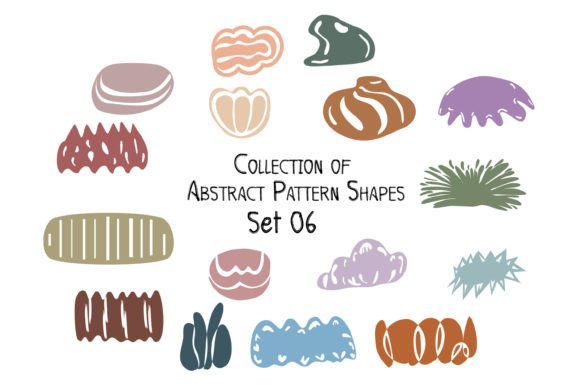
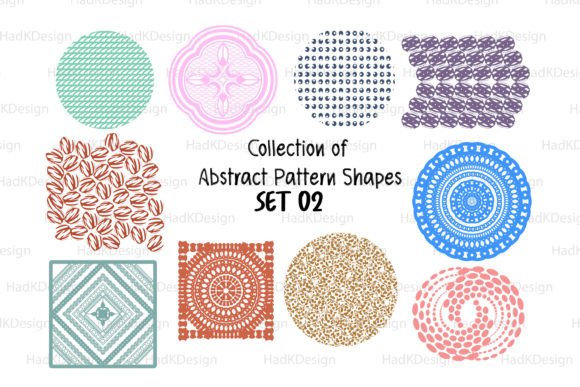
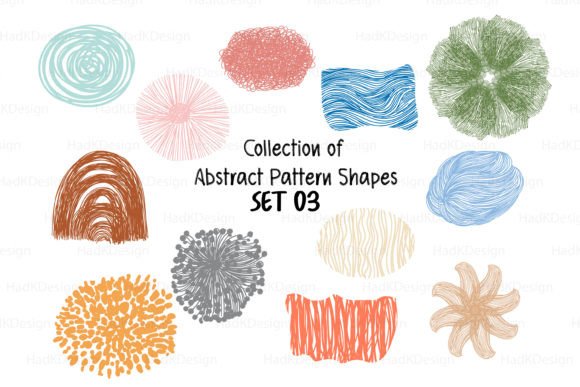
SVG stands for Scalable Vector Graphics, a file format that allows images to scale without losing quality. When paired with organic shapes, which mimic the irregular, flowing lines found in nature—like leaves, waves, or abstract blobs—they create unique visual textures. These patterns are ideal for backgrounds, overlays, or standalone decorative elements because they blend seamlessly into both minimalist and intricate designs.
Why They’re Popular in Design Projects
- Scalability: Since they're vector files (like .SVG and .EPS), they maintain clarity at any size, perfect for print or web use.
- Flexibility: You can easily edit colors, layers, and individual components using design software like Adobe Illustrator or free tools such as Inkscape.
- Versatility: Suitable for a wide range of applications including branding, invitations, apparel, home decor, and more.
- Aesthetic Appeal: The mix of geometry and organic forms creates an intriguing balance between structured and wild, appealing to diverse audiences.
Common Mistakes When Choosing and Using Abstract Pattern SVGs
Despite their benefits, many users make avoidable errors when selecting or applying these assets. Here’s a look at some common pitfalls and how to sidestep them:
1. Ignoring File Format Compatibility
Not all design platforms support every vector format. While .SVG is widely used, especially in web development and some crafting software, .EPS might be required for professional printing. Always check what formats your project needs before downloading.
Better approach: Look for bundles that include multiple file types, such as a set containing both SVG and EPS files, along with PNGs for previewing. This ensures you have the right tools for your workflow.
2. Overlooking Layer Organization
Many abstract pattern SVGs come with multiple layers, but if they aren’t properly labeled or separated, editing becomes a frustrating experience. Imagine trying to change one shape in a complex design only to discover it's merged with others.
Solution: Choose sets where each element is on its own layer, allowing for easy customization. A well-organized vector file saves time and effort during the design process.
3. Misusing Background Patterns
Some users apply abstract patterns directly as background elements without considering contrast or legibility. If the pattern is too busy, it can distract from the main content or text.
Example: A wedding invitation with an overly detailed abstract pattern may overshadow the names and dates. Instead, use a subtle version as a border or overlay.
Fix: Test different opacity levels or simplify the pattern to ensure it complements rather than competes with other design elements.
4. Assuming All “Organic” Files Are Unique
Organic shapes can often look similar across different packs, especially if they're generated by automated systems. This can lead to generic or unoriginal results.
Tip: Preview the SVG collection before purchasing. Many sellers provide a .JPG or .PNG preview so you can assess the variety and creativity of the shapes included.
5. Forgetting About Licensing and Usage Rights
When you download a digital asset like an SVG set, it’s crucial to understand the terms of use. Some abstract pattern SVG collections are for personal use only, while others allow commercial application—but not always in every context.
Best practice: Read the licensing information carefully. If you're unsure, contact the seller. With platforms like Creative Fabrica, payment confirmation often includes access to usage rights details, so leverage those resources.
How to Evaluate and Select the Right Set
Before committing to a purchase or download, consider these key factors to ensure you get value for your money and usability for your projects:
- Resolution and Quality: Check if the SVG files are clean, scalable, and contain crisp edges—even when manipulated.
- File Count and Variety: A set with 10–12 SVG files gives enough options for different projects without overwhelming you.
- Software Compatibility: Ensure the files work with your preferred design software. Most modern tools support SVG and EPS formats, but double-check just in case.
- Preview Images: Use the provided JPG or PNG previews to visualize how the patterns will look in real-world applications.
- License Scope: Determine whether you can use the patterns commercially, for resale, or in mass production.
Realistic Examples of How to Apply These Assets
Let’s explore a few practical ways to integrate Abstract Pattern SVG, Organic Shapes into your work:
- Product Packaging: Add depth and character to eco-friendly product labels by layering abstract organic patterns behind brand logos or slogans.
- Invitation Designs: Use soft, flowing shapes as watercolor-style accents to give a handcrafted feel to digital invites.
- Card Making: Create custom greeting cards with layered geometric and organic SVGs to highlight sentiments or add texture to photo collages.
- Web Banners: Incorporate abstract SVGs subtly into website headers or footers for a modern yet artistic touch.
Pro Tip: Combine Geometric and Organic Elements
One of the most effective techniques is blending geometric clipart with organic shapes. This contrast adds visual interest and can help guide the viewer’s eye through the design. For instance, a business card might feature sharp, angular lines in the foreground with a softer, abstract pattern in the background.
What to Do After Downloading Your SVG Set
Once you’ve downloaded your Abstract Pattern SVG, Organic Shapes zip file—which typically contains SVG, EPS, DXF, and PNG formats—here’s how to proceed efficiently:
- Unzip and Organize: Extract all files and sort them based on the format and intended use.
- Open in Design Software: Load the SVG or EPS files into your editor. Start experimenting with color changes and layout placement.
- Test Print or Display: Before finalizing a design, simulate the outcome. Will it look good in full color? Is it readable when printed on a textured surface?
- Backup Your Files: Store the original vector files separately from edited versions to preserve flexibility for future tweaks.
Final Thoughts on Maximizing Abstract Pattern SVGs
The beauty of Abstract Pattern SVG, Organic Shapes lies in their adaptability and the creative freedom they offer. But to truly benefit from them, it’s essential to plan your design process thoughtfully. Avoid the trap of choosing a pack just because it looks cool on the thumbnail; instead, evaluate how it fits your specific needs and style.
By investing in a high-quality, well-organized SVG bundle—like one that offers 12 distinct files across multiple formats—you empower yourself with versatile tools for both personal and professional projects. Remember, the goal is to enhance your design, not complicate it. With the right approach, these assets can become a valuable part of your creative toolkit.